

zcrLog
Unified Log Monitoring & SIEM
Centralized log management and SIEM for real-time visibility, search, alerts, reports, and Thai compliance-ready retention.
Changing log to visible value
Logs are everywhere, answers are not
Firewall, AD, endpoint, cloud, Microsoft 365, Entra ID, and network logs are difficult to search and prove unless they are normalized and retained correctly.
Unified Log Monitoring & SIEM
Sources, controls, workflow, and outcomes
zcrLog connects the operating layer around the product: what it reads, what it does, and what the team gets back.
Log Sources
Firewall · Active Directory · Endpoint · Network
Core zcrLog Capabilities
Computer Crime Act and PDPA log retention · Real-time dashboard and attack map · High-speed search and filtering
Log Visibility Outcomes
Compliance Retention · Real-Time Visibility · Fast Search · Enterprise Alerts
Log Visibility Outcomes
01
Compliance Retention
Support Computer Crime Act and PDPA retention workflows.
02
Real-Time Visibility
Dashboards and attack maps help teams see security status quickly.
03
Fast Search
Find required usage logs and events with accurate filtering.
04
Enterprise Alerts
Notify teams through LINE and Email when critical events appear.
Core zcrLog Capabilities
- Computer Crime Act and PDPA log retention
- Real-time dashboard and attack map
- High-speed search and filtering
- MITRE ATT&CK mapping
- Firewall, AD, endpoint, M365, Entra ID, and network integration
- Executive PDF reports and RBAC
Best For
Log Sources
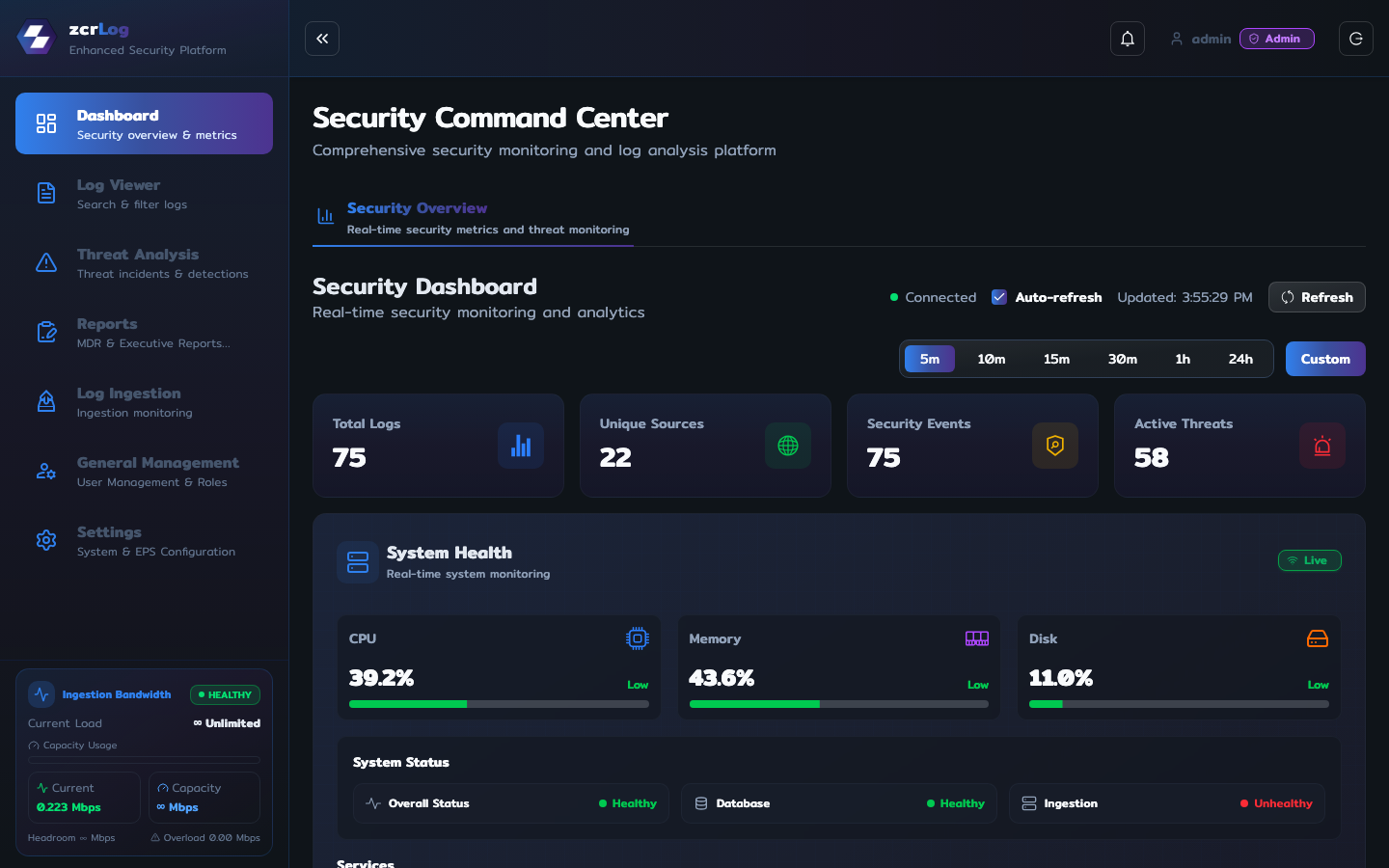
Security Command Center
Give security and IT teams one live view of log health, sources, events, and active threats.
- 1Track total logs, unique sources, security events, and active threats from one command center.
- 2Watch system, database, ingestion, and service health alongside the security workload.
- 3See ingestion bandwidth, events per second, and source status before gaps become investigation problems.
- 4Auto-refreshing metrics keep the first security conversation anchored in current operational reality.
Start every shift with what matters
Use the command center to decide whether the next task is a source-health fix, a search, or an active-threat investigation.
Search & Investigation
Move from a question to defensible evidence across infrastructure, identity, endpoint, and cloud logs.
- 1Search system, EDR, and Microsoft Entra ID logs from a single viewer.
- 2Filter by source, time range, and threat intelligence context without leaving the investigation flow.
- 3Export the evidence needed for incident response, audit, and follow-up work.
Answer the investigation, not just the alert
Trace a suspicious user, IP address, or endpoint across the available evidence while the facts are still fresh.
Threat Analysis
Connect incidents, detection rules, MITRE techniques, attack paths, and IP intelligence in one triage workspace.
- 1Manage detected incidents and the rules that create them.
- 2Use MITRE ATT&CK and attack-map views to add adversary context to raw events.
- 3Investigate suspicious IPs before deciding how to contain or escalate the incident.
Turn detection into a decision
Give analysts the context to distinguish a noisy event from an incident that needs immediate action.
Ingestion & Reporting
Keep collection reliable, then turn the same security evidence into operational and executive reports.
- 1Monitor ingestion status, protocols, source configuration, and custom integrations.
- 2Generate MDR and executive reports from zcrLog incidents and connected security sources.
- 3Choose the time range and report content before producing a stakeholder-ready update.
From collection confidence to executive clarity
Prove that the data arrived, then use it to show what happened and what the organization should do next.
zcrLog for Microsoft 365
Turn Microsoft 365 and Entra ID audit events into searchable security evidence.
- 1Collect Microsoft 365 audit, identity, and activity logs alongside firewall, endpoint, and network telemetry.
- 2Surface risky sign-ins, admin activity, mailbox activity, and tenant-level changes for SOC review.
- 3Search cloud identity evidence beside the endpoint, firewall, and network events that explain it.
Microsoft 365 audit and investigation
When a user account, mailbox, or admin role is questioned, search Microsoft 365, Entra ID, endpoint, firewall, and network evidence together.
zcrLog Deployment Options
Compliance-Ready Log Retention — Designed to help Thai organizations retain, search, and report logs for security operations and regulatory needs.
zcrLog FAQ
- Does zcrLog support Thai log compliance?Yes. It is positioned for Computer Crime Act and PDPA log retention workflows with secure storage and reporting.
- What sources can it collect?It supports firewall, Active Directory, endpoint, network devices, Microsoft 365, Entra ID, and other security sources.
Turn logs into visible security value
Try the live dashboard or talk with sales about the right deployment model.
zcrLog · Cyber Defense Made Visible